OHIP Billing·
Why Your OHIP Claim Rejected with EH5: Gapped Coverage, Service Dates, and How to Fix It
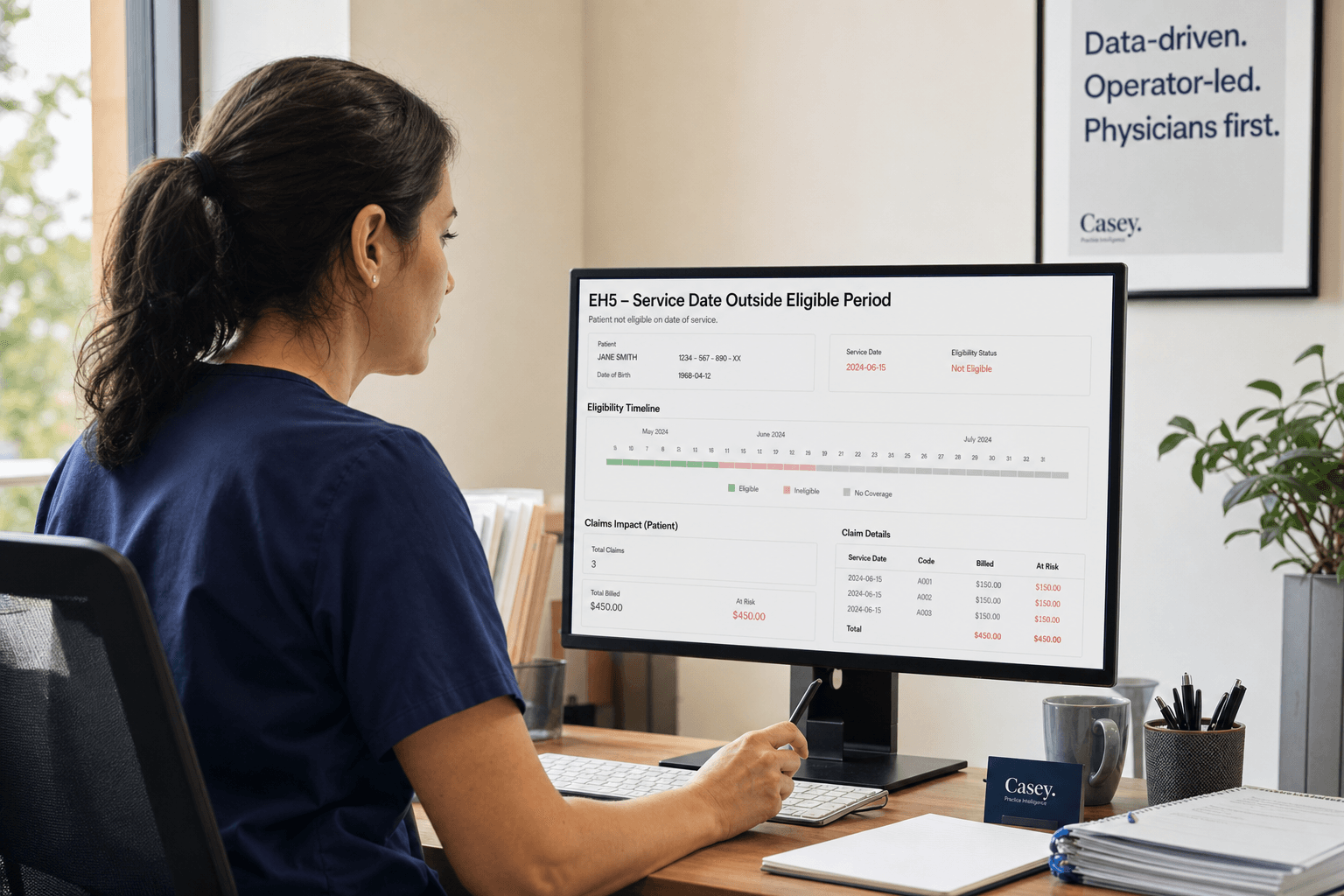
EH5 rejections mean your patient's service date fell outside any active OHIP coverage window. Here's how to triage, verify, and recover these claims.
When an EH5 hits your Claims Error Report, the instinct in most billing offices is to write it off — patient wasn't covered, nothing to be done. That instinct costs Ontario practices real money, because it skips the most important question: was this a genuine coverage gap, or did someone type the wrong date?
The answer determines everything about what you do next.
What EH5 Actually Means — and How It Differs from EH4 and EH1
EH5 fires when the Ministry of Health's records show the patient had no active coverage window that includes your service date. The key word is window. This is not the same as a single closed end date.
Here is how the three related error codes map to different coverage states:
- EH1 — The service date falls before the patient's coverage start date. They were not yet enrolled when you saw them.
- EH4 — The service date falls after a defined coverage end date. Coverage closed on a specific date and the encounter happened after it.
- EH5 — The service date does not fall within any active eligibility period. The patient had OHIP, lost it, and regained it — and your service date landed in the gap between those windows.
EH4 is a single boundary problem. EH5 is a structural gap problem. That distinction matters enormously for how you recover the claim, because EH4 sometimes corrects with a date fix, while EH5 requires verifying whether the gap itself was ever closed retroactively by the Ministry.
In our audits at Physicians First, we consistently see practices treating these three codes as interchangeable. They are not, and conflating them leads to either abandoning recoverable claims or wasting administrative hours chasing ones that have no recovery path.
How Gapped Coverage Happens — and Why It Is Harder to Catch Than a Closed End Date
Coverage gaps look like this in practice: a patient had valid OHIP, their card expired or their status changed, the Ministry closed the coverage window, the patient eventually re-registered at ServiceOntario, and a new coverage window opened with a later effective start date. The period between the old window closing and the new one opening is dead zone — and if your service date falls there, EH5 fires.
The scenarios where this surfaces most often in Ontario clinics include:
Referral-to-appointment lag. A specialist practice books a referral in Q1 and sees the patient in Q3. At the time of booking, the card was valid. Six months later, coverage lapsed during the wait. The card may even scan as "valid" on the day of the visit if the patient has since re-enrolled — but the service date is still in the gap. Standard point-in-time Health Card Validation will show green. The Ministry's date-bounded eligibility check will not.
Temporary Foreign Workers and post-graduation permit holders. OHIP coverage tied to a work permit expires when the permit expires. If the patient is on "maintained status" while waiting for IRCC approval, their OHIP often lapses in Ministry databases until the new permit is presented to ServiceOntario. The renewed card shows active today, but retroactive reinstatement may only begin on the new permit approval date — leaving encounters during the waiting period outside any covered window.
Returning Ontarians after extended absences. Patients who spend more than 212 days outside Canada in a 12-month period lose OHIP coverage. When they re-establish residency, the Ministry assigns a new effective start date. If your practice submits backlogged records or follow-up consults, the card may appear active under the new registration while the service date remains in the uncovered absence period.
Delayed renewals with retroactive gaps. When the Ministry closes a patient's coverage administratively — returned mail, failure to provide proof of residency — and the patient later re-registers, the new window does not automatically bridge the gap. The dead zone between termination and re-enrolment stays uncovered unless the patient successfully negotiates retroactive reinstatement with ServiceOntario.
What makes EH5 harder to catch than EH4 is that a simple "is this card valid today" check does not surface any of these scenarios. You need a validation query that transmits the actual date of service and checks whether that specific date falls within an active eligibility start-to-end span.
The 60-Second EH5 Triage: Is This a Keying Error or a Real Gap?
When an EH5 arrives, before you accept the loss, run this three-step sequence. The goal is to spend no more than 60 seconds confirming whether this is recoverable:
Step 1 — Audit your internal records (roughly 15 seconds). Pull the original chart note or intake form and compare it against what was submitted. Look specifically for transposed digits in the 10-digit Health Number, a typo in the two-letter Version Code, or a service date entry slip — for example, submitting 06/07 when the actual encounter was 07/06. A surprisingly high proportion of EH5 rejections we see in audits trace back to these small errors. If you find a mismatch, correct and resubmit within the three-month window. Done.
Step 2 — Run a real-time Ministry validation for the service date (roughly 30 seconds). If your internal records match what was submitted, validate the patient's eligibility specifically for the date of service — not today. Use your EMR's Health Card Validation integration or the MCEDT gateway. Critically, ensure the query transmits the actual Date of Service rather than the current system timestamp. If the Ministry returns an active status for that specific date, your submission contained an isolated error that the Ministry record did not reflect. Correct and resubmit.
Step 3 — Confirm the coverage status (roughly 15 seconds). If the Ministry validation confirms the patient was inactive on the service date, you have a verified coverage gap. The encounter happened during a period the government does not recognize as insured. Now you move to a cost-benefit decision.
This triage is worth doing on every EH5 before writing anything off. Practices that skip it are not saving time — they are systematically abandoning claims that could be fixed in under a minute.
When to Recover vs. When to Accept the Loss — A Practical Framework
Once Step 3 confirms a genuine gap, your next question is whether pursuing recovery is worth the administrative cost. Here is how we frame it:
| Claim Value | Action Protocol | Time Cap | |-------------|----------------|----------| | Low value (under $50, e.g., minor assessments) | Auto write-off or automated patient email. No manual calls. | Under 2 minutes total | | Mid value ($50–$200, e.g., standard consults) | Single batch outreach using a system template or one phone call. If no response within 14 days, route as a private patient invoice. | 5 minutes maximum | | High value (over $200, e.g., surgical blocks, complex rounds) | Full manual investigation. Cross-reference registration history, make repeated outreach attempts, prepare a stale-dated submission if Ministry record updates retroactively. | Up to 20–30 minutes |
The financial logic is simple: administrative labor in a clinic runs roughly $25–$35 per hour. Manual follow-up on a $40 claim consumes the entire margin. On a $400 claim, the same 20 minutes of work costs approximately $12 and recovers a multiple of that if successful.
Stop chasing an EH5 the moment the administrative cost of the next step exceeds the net recovery value of the claim.
How to Verify Eligibility Dates Properly in Your EMR — What Most Clinics Miss
Standard real-time Health Card Validation via EMRs returns whether a health number is valid as of today. It does not automatically confirm whether the patient was covered on a past service date. This is the critical workflow gap that generates most preventable EH5 rejections.
To verify properly:
Transmit the actual Date of Service, not the current timestamp. Many EMR integrations default to querying today's eligibility unless specifically configured to pass a historical date. Check your EMR settings or ask your vendor whether the HCV query includes DOS.
Audit the returned eligibility window boundaries. The Ministry validation should return an eligibility start date and an end date. Confirm that your service date sits strictly within that span. If the patient re-enrolled last month and you are billing for an encounter four months ago, the current active window will not cover the prior service date.
Watch for Version Code discrepancies. A change in version code frequently signals a re-enrolment event. If a claim for a prior visit is submitted under a newly issued version code without confirming retroactive coverage, the claim will fail even if the card appears active.
Do not rely on green checkmarks alone. Many EMR systems display a "Card Valid" indicator based on the patient's profile record without surfacing interruptions in the coverage timeline. The checkmark means the card number is recognized — it does not mean the service date is within a covered window.
The single most effective process change we recommend for practices with recurring EH5 patterns is shifting validation from "check at booking" to "automated batch HCV validation 48 hours before the appointment." When you book six months out, a card valid at booking time may have lapsed twice before the encounter. Running batch validation off the upcoming 48-hour day sheet catches those flags before the patient sits in the exam room — and converts a post-service billing failure into a proactive administrative alert that staff can act on before the encounter happens.
The Stale-Dated Resubmission Path for EH5 Claims Outside the Three-Month Window
Under Ontario INFOBulletin 230402, services rendered on or after April 1, 2023 carry a strict three-month submission window. If your original submission happened within that window and returned EH5, and the Ministry has since corrected or retroactively updated the patient's eligibility record, a formal stale-dated application can recover the claim.
Here is how that process works:
Confirm the eligibility update first. Before submitting anything, verify through real-time HCV or the overnight batch validation system that the Ministry record now shows the patient as active for the original service date. There is no point filing a stale-dated claim if the gap has not been closed.
Package and upload a designated stale-dated batch file. Generate corrected claims in your EMR and export them as a Stale Dated Claim file. Upload through the OPS BPS Secure / eSubmit portal using the "Stale Dated Claim File" option — not the regular monthly batch stream. Note the file upload reference number and submission date.
Send written notification to the Claims Services Branch. Email ClaimsManagement@ontario.ca with the following documentation:
- Physician full name, address, phone number, and six-digit billing number (and four-digit group number if applicable)
- The exact upload file number and date from the OPS BPS portal
- A table listing the patient's Ontario Health Number and version code, date of service, Schedule of Benefits fee codes, and claimed dollar amounts
- Copies of the original Claims Error Report showing the initial submission occurred within three months of service and returned EH5
- Evidence of retroactive eligibility — an HCV verification receipt or Ministry eligibility confirmation
- Physician or group lead signature on clinic letterhead
Two things consistently derail these applications. The first is bundling claims for multiple physicians into a single email — separate submissions per billing number. The second is submitting without proof of the original timely attempt. If you cannot show that the claim was first submitted within 90 days of service and rejected with EH5, the stale-dated application will not succeed.
Do not use the standard "Manual Review" flag in the regular monthly batch for stale-dated EH5 claims. That flag is not designed for this purpose and will not route the claim correctly.
Turning EH5 Patterns into a Weekly Audit Signal
An EH5 rejection is not just a billing problem to be fixed — it is a diagnostic signal for upstream workflow drift. When EH5 clusters appear in your Claims Error Report, they almost always correlate with one of two root causes: referral-to-appointment lags that let eligibility lapse between booking and encounter, or a validation workflow that only checks eligibility at booking and never again before the visit.
A practical weekly audit routine looks like this, run each Tuesday or Wednesday following the Ministry's Claims Error Report release:
- Generate a report targeting only EH5 rejections from the MCEDT gateway. For each rejected claim, extract three dates: the Referral Date, the Booking Date, and the Service Date.
- Calculate the lag between referral and service. If average lag exceeds 120 days across a cluster of EH5s, you have found the upstream cause.
- Review whether Health Card Validation was performed at booking only, or whether a fresh validation occurred within 48 hours of the appointment.
Two thresholds tell you what action to take:
- Under 2% of weekly submitted claims or fewer than 3 instances per practitioner: Address individually. These are isolated data-entry friction or one-off coverage gaps.
- 5% or more of weekly submitted specialty claims, or any cluster where average referral-to-appointment lag exceeds 120 days: Stop patching individual claims and audit your intake protocol. The problem is upstream, not in billing.
Practices with 6-month referral-to-appointment lags consistently see two to three times the EH5 rejection rate of practices with 4-week turnaround. The rejections are not random — they track directly with how long coverage has to change between booking and encounter.
This is exactly the kind of invisible drift that we recover in audits. A specialist running a busy referral volume may have dozens of EH5s per quarter that look like unavoidable coverage lapses but are actually preventable with a 48-hour pre-appointment batch validation sweep. The true cost of DIY OHIP billing often shows up precisely in these recurring, invisible losses that no one is measuring.
Understanding how your EMR connects to the Ministry's eligibility gateway is foundational to catching these before they become Claims Error Report noise. Your EMR choice directly affects how well your eligibility validation can be configured — and not all integrations transmit historical DOS queries the same way. If you are unsure whether your current system is running date-specific validation or defaulting to today's date, that is worth confirming with your vendor this week.
For practices still managing OHIP submissions manually or with minimal oversight, what medical school did not teach you about OHIP billing is a useful starting point for understanding how the eligibility and claims system is actually structured — and where the most common and costly gaps tend to appear.
Stay connected

Frequently Asked Questions
Q: What is the difference between EH5 and EH4 in OHIP billing?
EH4 fires when the service date is greater than a single defined eligibility end date — one boundary, one direction. EH5 fires when the service date does not fall within any active eligibility window. EH5 typically reflects gapped coverage: the patient had OHIP, it lapsed, and it was later re-established. Your service date landed in the gap between those two windows. The recovery path differs because EH4 sometimes corrects with a date or version code fix, while EH5 requires verifying whether the Ministry ever retroactively closed the gap.
Q: How do I know if an EH5 rejection is a keying error or a genuine coverage gap?
Run the 60-second triage. First, compare the submitted claim to the original chart for transposed digits in the Health Number, version code typos, or date entry slips. If you find a mismatch, correct and resubmit. If everything matches, run a real-time eligibility query that transmits your actual date of service through your EMR's MCEDT gateway. If the Ministry confirms the patient was active on that date, your submission had an isolated data error. If the Ministry confirms the patient was inactive on that date, you have a verified genuine gap and move to a cost-benefit decision.
Q: Can I recover an EH5 claim outside the three-month resubmission window?
Yes, under specific conditions. If your original submission occurred within three months of service and returned EH5, and the Ministry has since updated the patient's eligibility record to cover that date retroactively, you can file a stale-dated batch through the OPS BPS portal and send written documentation to ClaimsManagement@ontario.ca. The application requires proof of the original timely submission, the Ministry's eligibility update, and physician sign-off on clinic letterhead. Applications without the original Claims Error Report showing a within-90-day submission are consistently rejected.
Q: Should I bill the patient directly when EH5 confirms a genuine gap?
Only when you have confirmed through real-time Ministry validation that the patient had no active coverage on the service date and there is no outstanding possibility of retroactive correction. Document the eligibility verification before pursuing private billing. If there is any chance the Ministry will later correct the record — for example, the patient is waiting on an IRCC approval that would trigger retroactive OHIP reinstatement — hold the account and revisit once the Ministry updates the record.
Q: How often should I check for EH5 patterns in my Claims Error Report?
Weekly. Run the audit every Tuesday or Wednesday after the Ministry's error report releases. Calculate the lag between referral date and service date for each EH5 cluster. If that average lag exceeds 120 days, or if EH5s represent 5% or more of your weekly submitted specialty claims, stop patching individual rejections and audit your intake validation protocol. The recurrence rate drops substantially — often 60–80% within the first month — once practices shift to automated batch Health Card Validation 48 hours before each appointment rather than validating only at the time of booking.
If your Claims Error Report is regularly returning EH5 rejections and you are not sure whether those are keying errors, genuine gaps, or workflow failures waiting to be fixed, that is exactly the kind of audit we run at Physicians First. Most practices do not know how much they are losing to recoverable EH5s until someone measures it.
Book your free OHIP billing review and we will show you what is recoverable in your specific error history — before you write off another claim you did not have to.
References
No external sources were confirmed as scrapeable by Firecrawl for this post. The clinical and administrative information in this article reflects Ontario Ministry of Health billing documentation, including Ontario INFOBulletin 230402 (effective April 1, 2023), the MCEDT Claims Error Report framework, and Physicians First audit observations across Ontario specialist practices. Readers seeking primary source confirmation should consult ontario.ca OHIP billing documentation and the OPS BPS Secure eSubmit portal directly.